
COMPUTER VISION SYNDROME (CVS)/DIGITAL STRAIN/DRY EYE DISEASE (DED)
Computers are now an integral part of our daily life. We wake up to the glow of our phones as alarm. Our days are filled with electronic images of news reports, movies, video games, emails, texts, online shopping, work, and of course online class/school.
Technology has become a part and parcel of our lives and with that our working hours on digital screens have increased multifold. With all its benefits come certain health related issues also and awareness of which is minimal. I am going to explain some basic information on screen related issues- popularly known as Computer Vision Syndrome/Digital Strain.
Definition
Computer Vision Syndrome (CVS), also referred to as Digital Eye Strain, describes a group of eye and vision-related problems that result from prolonged Digital screens (Laptop/Desktop, Television, Tablets, Smart phones, Digital reading devices, Gaming devices) usages. Prolonged usage of digital screens will lead to eye fatigue and evaporative dryness in the eyes.
Etiological Factors
- Decreased blinking and Tear function
- Continuous work without break
- Seating posture- poorly supported head and neck
- Poor workstation setup or improper use of workstation
- Illumination at the work place
- Glare and reflections from the monitor and surroundings
- Environment- Air conditioning, dry and windy weather, air pollution and allergy
- Uncorrected spectacle power
- Inappropriate glasses for computer use
- Difficulty in eye coordination at near work
- Strain on the muscles of the eye due to work style
- Associated with some of the eye surgeries, eye medications or systemic medications
- Associated with Lid margin diseases/problems
- Contact lens use –abuse, Eye makeup- abuse
- Job nature and stress
- Can be associated with certain systemic diseases like thyroid, hormone fluctuation, Rheumatoid diseases etc.
- Pre- and Post-menopausal women
- With age dryness increases
- Associated with some congenital diseases
- Combination of multiple factors
Symptoms
Discomfort in the eyes-
- Foreign body/Gritty sensation
- Irritation
- Burning
- Itching
- Watering
- Dry feeling
Vision related issues-
- Glared or blurred or shaky (off and on blurriness) vision
Other issues of the eyes-
- Tired &/or sleepy eye
- Deep socket pain or pulling sensation in eye
- Typical evening Headache or heaviness in head or eyes
- Redness of the eyes
Patient will have symptom, either any one of them or multiple of them, either in one eye or both eyes.
Also, patient can have good day or bad day.
Why you should not ignore Dry Eye symptoms?
- Eye infections- Your tears protect the surface of your eyes from infection. Without adequate tears, you may have an increased risk of eye infection.
- Damage to the surface of your eyes- If left untreated, severe dry eyes may lead to eye inflammation, abrasion of the corneal surface, corneal ulcer, and vision disturbances.
- Decreased quality of life- Dry eyes can make it difficult to perform everyday activities, such as reading, driving, etc.
Treatment of CVS
- Lubricating Drops- ideally should be continued for couple of weeks or sometimes months as Dryness takes some time to settle down
- Education about good habits while working on digital screen
- Medications to improve Tear film production- when dry is associated with some other factors also
Good habits while working on computer
“Prevention is better than cure”
- Location of computer screen – The computer screen should be 15 to 20 degrees below eye level (about 4 or 5 inches) as measured from the center of the screen and 30cm (Arm length) from the eyes. If it is Desktop then should be at the level of your eyes and beyond 30 cm away from you.
- Mobile also should be kept in front of you over the stand, if you need to work for long hours over it. Please do not bend your neck while working on mobile especially for long hours
- Reference materials – These materials should be located above the keyboard and below the monitor or use a document holder, and can be used beside the monitor
- Seating position – Chairs should be comfortably padded and adjusted to rest your feet flat on the floor. Chair arms adjusted to provide arm support while you are typing. Support to your wrists when typing
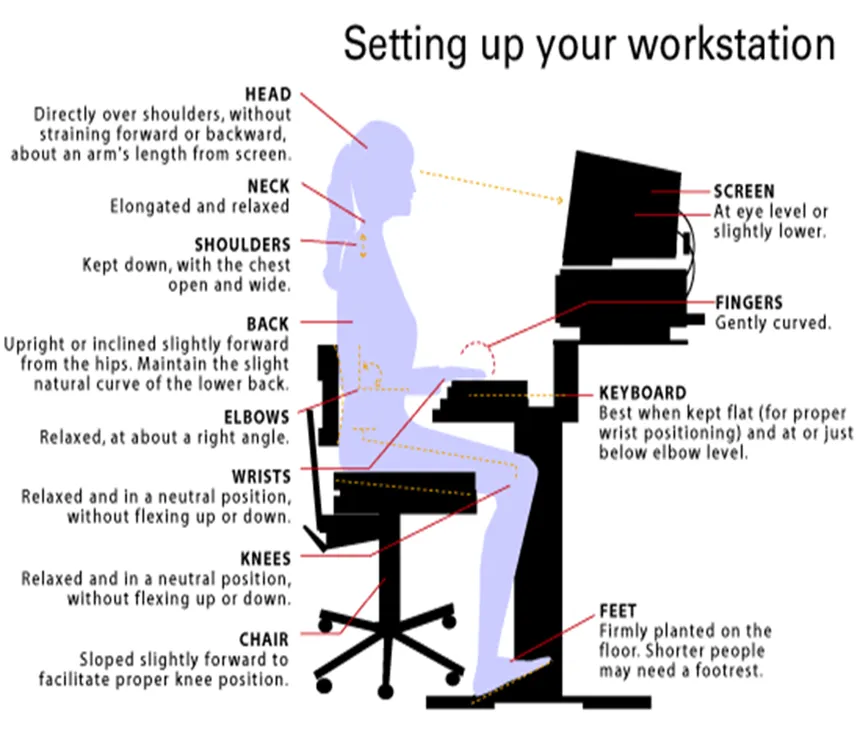
- Blinking – make an effort to blink frequently. Blinking helps to make normal healthy tear film and keeps the front surface of your eye moist
- Follow 20-20-20 rule – Rest rules – every 20 minutes, look at the distance of 20 feet, for 20 seconds- this will not only provide rest to your accommodative eye muscles, but also works as your blinking break.
- AC breaks- Rest your eyes for 15 minutes after 4-6 hours of continuous computer use
- Exercise your eyes- Yoga exercises
- Lighting – Position the computer screen to avoid glare, use blinds or drapes on windows and replace the light bulbs in desk lamps with bulbs of lower wattage
- Anti-glare screens – If there is no way to minimize glare from light sources, consider using a screen glare filter which decrease the amount of light reflected from the screen
- Keep screen dust free
- Replace old monitor to LCD screen
- Adjust computer settings- Brightness, contrast, text size, Color temperature
- Cold compression over lid margin
- Exposure to blue light blocks the secretion of Melatonin, which is important for body’s circadian rhythm- body’s wakefulness and sleep cycle. That is why ideally, 2 hours before sleep, stop using of all digital devices to get normal and sound sleep. This is very important for all, across all age groups
- Eat healthy- Food rich in Vitamin A, D, E and Omega 3 Fatty Acid
- Get a comprehensive eye examination by an Ophthalmologist
- If you have refractive error and wearing glasses then wear them with ARC. Blue filter glass to protect your eyes from harmful rays from digital screen- This is a very controversial recommendation, as there are no proofs or studies to prove that! (Check American Academy of Ophthalmologists website)
Other treatment of Dry Eye
- Eyelid margin diseases (Meibomian Gland Diseases/MGD) requires thorough, long-term treatment, as most of them are Chronic diseases
- Lid margin hygiene- like regular thorough cleaning of Lid margin/Eyelashes- is very important, as recurrence is very high
- Warm compression over lid margin in case of Lid margin diseases
- Advanced cases of MGD- Lid Laser Therapy
- Taking care of Systemic Diseases like Thyroid disease, Rheumatoid Disease etc.
- Deficiency of Vitamin D and Vitamin B12 should be taken care.
CHILDREN AND DIGITAL SCREEN
- Current evidence shows that digital media differ in their impacts on cognition, psycho-social function, and physical health, and that benefits and risks are nuanced
- ‘Screen time’ refers to time spent with any screen, including smart phones, tablets, television, video games, computers, or wearable technology
- There is a world-wide epidemic of Myopia, also known as nearsightedness. Clearly, something is going on, but scientists cannot agree on exactly what are the reasons. Though many strongly attribute it to rising exposure to digital screen and less outdoor activity.
- Many studies suggest that, at least part of the worldwide increase in nearsightedness, has to do with near work activities; not just digital screen time but also traditional books
- Also, it is recommended that spending time outdoors—especially in early childhood—can slow the progression of nearsightedness, though exact reasons are still unclear
- Kids also get digital eyestrain like adults. They can experience dry eye, eye strain, headaches, and blurry vision, too. While symptoms are typically temporary, they may be frequent and sometime persistent
10 tips to help protect your child’s eyes from computer eyestrain
- Set a kitchen timer or a smart device timer to remind them.
- Alternate reading with an e-book and with a real book. Encourage kids to look up and out the window every two chapters or 20-30 minutes.
- After completing a level in a video game, look out of the window for some time.
- Pre-mark books with a paperclip every few chapters to remind your child to look up. On an e-book, use the “bookmark” function for the same effect.
- Avoid using a computer outside or in brightly lit areas, as the glare on the screen can create strain.
- Adjust the brightness and contrast of your computer screen so that it feels comfortable to you
- Use good posture when using a computer and when reading
- Encourage your child to hold digital media farther away, 18 to 24 inches is ideal
- Create a distraction that causes your child to look up every now and then
- Remind them to blink when watching a screen
- No digital screens at least 2 hours before going to bed
Ideal screen time for Children
- Less than 2 years – no digital screen
- 2-8 years- 2-3 hours a day with multiple breaks
- 8-teens- 4-5 hours a day with multiple break

M.S. (Ophth), FLVPEI (Cornea & Anterior Segment). Medical Director, CSR Eye Hospital, Hyderabad, with 29+ years of experience in cataract, cornea and refractive surgery.
View full profile →